Table of Content
- All Television Brands Repair Services Center at Luthuli Avenue by Silicon Electronics
- Why Choose Silicon Electronics for Your Television Repair Needs
- Expert Technicians with Extensive Experience
- Comprehensive Brand Coverage
- State-of-the-Art Repair Facilities
- Quick Turnaround Time
- Affordable and Transparent Pricing
- Genuine Parts and Quality Assurance
- Exceptional Customer Service
- Our Television Repair Services
- Screen Repairs and Replacements
- Power Supply Repairs
- Audio Repairs
- Connectivity and Port Repairs
- Motherboard and Main Board Repairs
- Software and Firmware Updates
- Panel and Display Repairs
- Remote Control and Accessory Repairs
- Television Brands and Models We Repair
- The Silicon Electronics Repair Process
- Step 1: Initial Consultation and Diagnosis
- Step 2: Quote and Approval
- Step 3: Repair Execution
- Step 4: Testing and Quality Assurance
- Step 5: Pickup and Follow-Up
- Common Television Problems and Their Solutions
- No Power or TV Not Turning On
- No Display or Black Screen
- Distorted or No Audio
- HDMI or Other Ports Not Working
- Dead Pixels or Screen Burn-In
- TV Randomly Turns Off or Restarts
- Smart TV Apps Crashing or Freezing
- Wi-Fi or Ethernet Connectivity Issues
- Tips for Maintaining Your Television
- Proper Placement and Ventilation
- Cleaning Your Television
- Power and Electrical Safety
- Software and Firmware Maintenance
- Handling and Moving Your Television
- Preventing Screen Damage
- Customer Testimonials
- Why Silicon Electronics Stands Out
- Unmatched Expertise
- Comprehensive Services
- Customer-Centric Approach
- State-of-the-Art Facilities
- Affordable Pricing
- Convenient Location
- Fast Turnaround Time
- Warranty and Guarantee
- Contact Us
All Television Brands Repair Services Center at Luthuli Avenue by Silicon Electronics
Along Luthuli Avenue, Silicon Electronics stands as your premier destination for comprehensive television repair services. As technology continues to evolve at a rapid pace, televisions have become more than just entertainment devices—they are central hubs for information, connectivity, and family gatherings. When your television malfunctions, it disrupts not just your viewing experience but also the rhythm of your daily life. This is where Silicon Electronics steps in, offering unparalleled expertise in repairing all major television brands and models, ensuring that your investment continues to deliver optimal performance for years to come.

At Silicon Electronics, we understand the frustration that comes with a malfunctioning television. Whether it is a flickering screen, distorted audio, power issues, or connectivity problems, our team of highly skilled technicians is equipped with the knowledge, tools, and experience to diagnose and repair a wide range of television issues. Our repair center at Kang’ari Building, Luthuli Avenue, is strategically located to serve the Nairobi community with convenience and efficiency. With a commitment to quality, affordability, and customer satisfaction, we have established ourselves as a trusted name in television repair services.
Why Choose Silicon Electronics for Your Television Repair Needs
Choosing the right repair service for your television is crucial. Television sets, regardless of their brand or model, are complex electronic devices that require specialized knowledge and precision to repair. At Silicon Electronics, we pride ourselves on offering services that go beyond mere repairs—we provide peace of mind. Here are some compelling reasons why we are the preferred choice for television repairs in Nairobi:
Expert Technicians with Extensive Experience
Our team comprises certified technicians who have undergone rigorous training and possess years of hands-on experience in repairing a diverse range of television brands and models. From the latest smart TVs to older plasma and LCD models, our experts have seen it all. We continuously update our knowledge base to keep up with the latest technological advancements in the television industry, ensuring that we can handle even the most modern and sophisticated devices.
Comprehensive Brand Coverage
One of our standout features is our ability to repair televisions from virtually all major brands available in the market. Unlike some repair centers that specialize in only a few brands, Silicon Electronics offers a universal repair service. This means that regardless of whether you own a Sony, Samsung, LG, TCL, Hisense, or any other brand, you can trust us to provide the same level of expertise and care. Our extensive brand coverage is a testament to our versatility and commitment to serving a wide customer base.
State-of-the-Art Repair Facilities
Our repair center at Kang’ari Building is equipped with state-of-the-art diagnostic and repair tools. We invest in the latest technology to ensure that our technicians can accurately diagnose issues and perform repairs with precision. From advanced circuit testers to specialized software for smart TV diagnostics, we have the resources to handle any television repair job efficiently and effectively.
Quick Turnaround Time
We understand that your television is an essential part of your daily life, and being without it for an extended period can be inconvenient. That is why we prioritize quick turnaround times without compromising on the quality of our repairs. Most minor repairs are completed within 24 to 48 hours, while more complex issues are resolved within a few days. We also offer express services for urgent repairs, ensuring that you are back to enjoying your favorite shows and movies in no time.
Affordable and Transparent Pricing
At Silicon Electronics, we believe in fair and transparent pricing. Before we begin any repair work, we provide a detailed quote that outlines the cost of parts (if needed) and labor. There are no hidden fees or surprise charges—what we quote is what you pay. We also offer competitive rates that are often more affordable than purchasing a new television, making repairs a cost-effective solution for extending the life of your device.
Genuine Parts and Quality Assurance
We use only genuine, high-quality replacement parts for all our repairs. Whether it is a new screen, a motherboard, a power supply unit, or any other component, we source our parts from reputable suppliers to ensure durability and reliability. Our repairs come with a warranty, giving you the confidence that the job is done right. If the same issue recurs within the warranty period, we will fix it free of charge.
Exceptional Customer Service
Customer satisfaction is at the core of our business. From the moment you contact us—whether by phone, email, or in person—you will experience professional and courteous service. Our staff is always ready to answer your questions, provide updates on your repair, and offer advice on how to care for your television. We treat every customer with respect and strive to build long-lasting relationships based on trust and reliability.
Our Television Repair Services
Silicon Electronics offers a wide range of repair services to address virtually any issue your television may encounter. Our services are designed to cater to both modern smart TVs and older models, ensuring that no matter what type of television you own, we have the expertise to fix it. Below is an overview of the services we provide:
Screen Repairs and Replacements
The screen is the most critical component of your television, and damage to it can significantly impact your viewing experience. We specialize in repairing and replacing screens for all types of televisions, including:
- Cracked or Shattered Screens: Accidental impacts can cause cracks or shattering. We can replace the screen with a new one that matches the original specifications of your TV.
- Dead Pixels: Dead or stuck pixels can be annoying. We use advanced techniques to revive pixels or replace the panel if necessary.
- Backlight Issues: If your screen is dim or has uneven lighting, the backlight may be faulty. We can repair or replace backlight strips and inverters.
- Screen Burn-In: Common in OLED and plasma TVs, burn-in can cause permanent images to appear on the screen. We offer solutions to mitigate this issue.
Power Supply Repairs
Power-related issues are among the most common problems we encounter. If your television is not turning on, turns off randomly, or experiences power fluctuations, the issue may lie with the power supply unit. Our services include:
- Power Board Replacement: We can replace faulty power boards with genuine parts.
- Fuse and Capacitor Replacement: Blown fuses or leaky capacitors can cause power issues. We can replace these components to restore functionality.
- Surge Damage Repair: Power surges can damage sensitive components. We can assess the extent of the damage and perform the necessary repairs.
Audio Repairs
Sound is just as important as the visual experience when it comes to televisions. If you are experiencing audio issues, such as no sound, distorted sound, or low volume, we can help. Our audio repair services include:
- Speaker Replacement: If your TV’s built-in speakers are damaged, we can replace them with high-quality alternatives.
- Audio Board Repairs: Faulty audio boards can cause sound issues. We can diagnose and repair or replace these boards.
- HDMI ARC and Optical Audio Fixes: If your TV is not transmitting audio through HDMI ARC or optical ports, we can troubleshoot and fix the issue.
Connectivity and Port Repairs
Modern televisions come with a variety of ports and connectivity options. If your TV is not recognizing connected devices or has damaged ports, we can repair or replace:
- HDMI Ports: We can fix or replace damaged HDMI ports, ensuring you can connect your gaming consoles, Blu-ray players, and other devices.
- USB Ports: If your TV’s USB ports are not working, we can repair or replace them to restore functionality for media playback.
- Wi-Fi and Ethernet Connectivity: For smart TVs, we can troubleshoot and repair Wi-Fi and Ethernet connectivity issues, ensuring you can access streaming services.
- Antenna and Cable Inputs: We can repair or replace coaxial inputs for cable and antenna connections.

Motherboard and Main Board Repairs
The motherboard is the brain of your television, controlling all its functions. If your TV is experiencing multiple issues, such as not turning on, no display, or random reboots, the motherboard may be at fault. Our services include:
- Motherboard Diagnostics: We use advanced tools to diagnose motherboard issues accurately.
- Component-Level Repairs: We can replace individual components on the motherboard, such as IC chips, resistors, and transistors.
- Full Motherboard Replacement: If the motherboard is beyond repair, we can replace it with a compatible unit.
Software and Firmware Updates
Smart TVs rely on software and firmware to function correctly. If your TV is running slowly, freezing, or not responding to commands, a software issue may be the culprit. We offer:
- Firmware Updates: We can update your TV’s firmware to the latest version to fix bugs and improve performance.
- Factory Resets: If your TV is experiencing software glitches, a factory reset can often resolve the issue.
- App and System Troubleshooting: We can diagnose and fix issues with pre-installed apps and system software.
Panel and Display Repairs
In addition to screen replacements, we also handle other display-related issues, such as:
- Color Calibration: If your TV’s colors appear washed out or inaccurate, we can calibrate the display to restore vibrant, accurate colors.
- Contrast and Brightness Adjustments: We can fine-tune your TV’s settings to optimize picture quality.
- 3D and HDR Repairs: For TVs with 3D or HDR capabilities, we can troubleshoot and repair issues related to these features.
Remote Control and Accessory Repairs
Sometimes, the issue may not be with the TV itself but with its accessories. We offer:
- Remote Control Repairs: We can fix or replace non-responsive or damaged remote controls.
- Battery Compartment Repairs: If your remote’s battery compartment is damaged, we can repair or replace it.
- Universal Remote Programming: We can program universal remotes to work with your TV and other devices.

Television Brands and Models We Repair
At Silicon Electronics, we take pride in our ability to repair televisions from a wide range of brands and models. Below is a detailed table listing the brands we service, along with some of the most popular models we frequently repair. This table is not exhaustive, so if you do not see your specific model listed, please contact us—chances are, we can still help!
| Brand | Model Series | Types | Common Issues We Fix |
|---|---|---|---|
| Sony | Bravia XR A95K, A90K, A80K | OLED, QLED, LED, Smart TV | Screen burn-in, power issues, audio problems, software glitches, HDMI port failures |
| Bravia X95K, X90K, X85K, X80K | LED, 4K, 8K, Smart TV | Backlight failures, dead pixels, connectivity issues, remote control problems | |
| Bravia A9G, A8G, X95G, X90G | OLED, LED, Smart TV | Motherboard failures, screen replacements, firmware updates | |
| Bravia X85G, X80G, X75G | LED, 4K, Smart TV | Power supply issues, audio board repairs, Wi-Fi connectivity problems | |
| Bravia KD-55X8500G, KD-65X9000G | LED, 4K, Smart TV | HDMI port repairs, screen calibration, app crashes | |
| Bravia W800, W600, R350 | LED, Full HD, Smart TV | Software updates, remote control issues, speaker replacements | |
| Samsung | QN900C, QN800C, QN700C | Neo QLED, 8K, 4K, Smart TV | Screen uniformity issues, power cycling, audio sync problems, app freezing |
| QN90B, QN85B, QN80B, QN70B | QLED, 4K, Smart TV | Backlight bleeding, dead pixels, HDMI ARC issues, Wi-Fi drops | |
| CU8000, CU7000, CU6000 | Crystal UHD, 4K, Smart TV | Power board failures, speaker distortions, USB port malfunctions | |
| TU8000, TU7000, TU6000 | UHD, 4K, Smart TV | Motherboard replacements, screen cracks, software resets | |
| AU8000, AU7000, AU6000 | UHD, 4K, Smart TV | Connectivity issues, remote control pairing, audio board repairs | |
| QA55Q60T, QA65Q70T | QLED, 4K, Smart TV | Screen replacements, power supply repairs, firmware updates | |
| LS03, LS01 (The Frame) | Lifestyle TV, 4K, Smart TV | Display panel issues, art mode malfunctions, Wi-Fi connectivity | |
| LG | OLED C3, G3, E3, Z3 | OLED, 4K, 8K, Smart TV | Screen burn-in, dead pixels, power issues, audio problems, webOS glitches |
| OLED B3, A3 | OLED, 4K, Smart TV | Panel replacements, backlight failures, HDMI port repairs | |
| NanoCell NANO99, NANO95, NANO90 | NanoCell, 4K, Smart TV | Color calibration, connectivity issues, software updates | |
| QNED QNED99, QNED95, QNED90 | QNED, 4K, Smart TV | Backlight failures, motherboard issues, remote control problems | |
| UQ8000, UQ7000, UQ6000 | UHD, 4K, Smart TV | Power supply repairs, audio board replacements, Wi-Fi issues | |
| UP8000, UP7000, UP6000 | UHD, 4K, Smart TV | Screen replacements, HDMI port failures, app crashes | |
| 27LQ6300, 32LQ6300 | LED, HD Ready, Smart TV | Software glitches, remote control issues, speaker replacements | |
| TCL | QM8, Q7, Q6 | QLED, 4K, Smart TV | Backlight issues, power cycling, audio sync problems, Android TV glitches |
| C845, C745, C645 | 4K, Smart TV | Screen replacements, HDMI port repairs, Wi-Fi connectivity issues | |
| P745, P645, P615 | 4K, Smart TV | Motherboard failures, power supply issues, app freezing | |
| 5-Series (50S5400, 55S5400) | 4K, Smart TV | Dead pixels, connectivity problems, remote control malfunctions | |
| 4-Series (40S4400, 43S4400) | Full HD, Smart TV | Software updates, speaker distortions, USB port repairs | |
| 3-Series (32S3300, 40S3300) | HD, Smart TV | Power board failures, screen calibration, audio board repairs | |
| Hisense | U8K, U7K, U6K | ULED, 4K, Smart TV | Backlight bleeding, power issues, audio problems, Vidaa OS glitches |
| A9K, A7K, A6K | 4K, Smart TV | Screen replacements, HDMI port failures, Wi-Fi connectivity issues | |
| U8H, U7H, U6H | ULED, 4K, Smart TV | Motherboard replacements, dead pixels, app crashes | |
| A9H, A7H, A6H | 4K, Smart TV | Power supply repairs, speaker replacements, remote control problems | |
| 50A6G, 55A6G, 65A6G | 4K, Smart TV | Software updates, connectivity issues, audio board repairs | |
| 43A4G, 50A4G | Full HD, Smart TV | Screen calibration, HDMI ARC issues, Wi-Fi drops | |
| Philips | The One 9808, 9508, 9008 | 4K, OLED, Smart TV | Screen burn-in, power cycling, audio sync problems, Android TV glitches |
| The One 8508, 8008, 7508 | 4K, LED, Smart TV | Backlight failures, dead pixels, HDMI port repairs, software updates | |
| Ambilight 7000, 6500, 5800 | LED, 4K, Smart TV | Ambilight malfunctions, connectivity issues, motherboard failures | |
| 5000, 4300, 3200 Series | Full HD, HD, Smart TV | Power supply issues, speaker distortions, remote control repairs | |
| 24PFS5803, 32PFS5803 | HD, Smart TV | Software glitches, screen replacements, Wi-Fi connectivity problems | |
| Panasonic | Master OLED Ultimate MZ2000 | OLED, 4K, Smart TV | Screen burn-in, power issues, audio problems, Fire OS glitches |
| Master OLED MZ1000, MZ980 | OLED, 4K, Smart TV | Panel replacements, backlight failures, HDMI port repairs | |
| NanoCell JZ2000, JZ1500 | NanoCell, 4K, Smart TV | Color calibration, connectivity issues, software updates | |
| VIERA TX-55JX800, TX-65JX850 | LED, 4K, Smart TV | Power supply repairs, audio board replacements, Wi-Fi issues | |
| VIERA TX-43GX600, TX-50GX600 | LED, 4K, Smart TV | Screen replacements, HDMI port failures, app crashes | |
| VIERA TH-43FS600, TH-50FS600 | Full HD, Smart TV | Software updates, remote control issues, speaker replacements | |
| Xiaomi | Mi TV Q2, Q1 | QLED, 4K, Smart TV | Backlight issues, power cycling, audio sync problems, PatchWall glitches |
| Mi TV A Pro, A2, A1 | 4K, Full HD, Smart TV | Screen replacements, HDMI port repairs, Wi-Fi connectivity issues | |
| Mi TV P1, P2 | 4K, Smart TV | Motherboard failures, power supply issues, app freezing | |
| Mi TV 4X, 4A | Full HD, HD, Smart TV | Dead pixels, connectivity problems, remote control malfunctions | |
| Haier | H65S9UG, H55S9UG | 4K, Smart TV | Backlight bleeding, power issues, audio problems, Android TV glitches |
| H50K6UG, H43K6UG | 4K, Smart TV | Screen replacements, HDMI port failures, Wi-Fi connectivity issues | |
| H32S3UG, H40S3UG | HD, Smart TV | Motherboard replacements, dead pixels, app crashes | |
| LE32A6000, LE40A6000 | Full HD, Smart TV | Power supply repairs, speaker replacements, remote control problems | |
| Skyworth | S9A, S8A, S7A | 4K, Smart TV | Backlight issues, power cycling, audio sync problems, Android TV glitches |
| G7, G6, G5 | 4K, Full HD, Smart TV | Screen replacements, HDMI port repairs, Wi-Fi connectivity issues | |
| E5, E4, E3 | Full HD, HD, Smart TV | Motherboard failures, power supply issues, app freezing | |
| Changhong | Q5K, Q3K, Q2K | 4K, Smart TV | Backlight bleeding, power issues, audio problems, Android TV glitches |
| U5K, U3K, U2K | 4K, Full HD, Smart TV | Screen replacements, HDMI port failures, Wi-Fi connectivity issues | |
| A5, A3, A2 | Full HD, HD, Smart TV | Motherboard replacements, dead pixels, app crashes | |
| Konka | Android TV 55U65, 50U65 | 4K, Smart TV | Backlight issues, power cycling, audio sync problems, Android TV glitches |
| Android TV 43U55, 32U55 | Full HD, HD, Smart TV | Screen replacements, HDMI port repairs, Wi-Fi connectivity issues | |
| K5, K4, K3 | 4K, Full HD, Smart TV | Motherboard failures, power supply issues, app freezing | |
| Startimes | 32H6200, 40H6200 | HD, Smart TV | Software updates, connectivity issues, remote control repairs |
| 24H5200, 32H5200 | HD, Smart TV | Screen calibration, audio board repairs, Wi-Fi drops | |
| Syinix | 55U1, 50U1, 43U1 | 4K, Smart TV | Backlight issues, power cycling, audio sync problems, Android TV glitches |
| 32S4, 40S4, 43S4 | Full HD, HD, Smart TV | Screen replacements, HDMI port repairs, Wi-Fi connectivity issues | |
| Ramtons | 32S8, 40S8, 50S8 | Full HD, HD, Smart TV | Motherboard failures, power supply issues, app freezing |
| 24S5, 32S5 | HD, Smart TV | Dead pixels, connectivity problems, remote control malfunctions | |
| Bruhm | 32B4, 40B4, 50B4 | Full HD, HD, Smart TV | Backlight bleeding, power issues, audio problems, Android TV glitches |
| 24B2, 32B2 | HD, Smart TV | Screen replacements, HDMI port failures, Wi-Fi connectivity issues | |
| Sanyo | DP42840, DP55840 | Full HD, Smart TV | Power supply repairs, audio board replacements, remote control problems |
| DP32640, DP40640 | HD, Smart TV | Software updates, screen calibration, app crashes | |
| Toshiba | 55C350KE, 50C350KE | 4K, Smart TV | Backlight issues, power cycling, audio sync problems, Fire TV glitches |
| 43C350KE, 32C350KE | Full HD, HD, Smart TV | Screen replacements, HDMI port repairs, Wi-Fi connectivity issues | |
| JVC | LT-55MAW595, LT-49MAW595 | 4K, Smart TV | Motherboard failures, power supply issues, app freezing |
| LT-43CF695, LT-32CF695 | Full HD, HD, Smart TV | Dead pixels, connectivity problems, remote control malfunctions |
The Silicon Electronics Repair Process
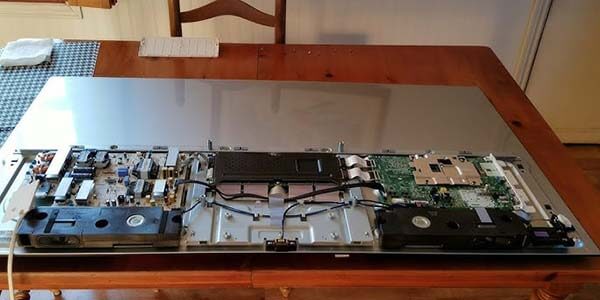
At Silicon Electronics, we follow a streamlined and transparent repair process to ensure that your television is repaired efficiently and to the highest standards. Here is what you can expect when you bring your TV to our repair center at Kang’ari Building, Luthuli Avenue:
Step 1: Initial Consultation and Diagnosis
The first step in our repair process is a thorough consultation and diagnosis. When you bring your television to our center, our technicians will ask you a series of questions to understand the issues you are experiencing. This may include:
- The brand and model of your television.
- A description of the problem (e.g., no power, no display, distorted audio, etc.).
- When the problem started and whether it occurred suddenly or gradually.
- Any recent changes, such as moving the TV or connecting new devices.
After the initial consultation, our technicians will perform a comprehensive diagnostic test using advanced tools and equipment. This may involve:
- Visual Inspection: Checking for physical damage, such as cracks, burns, or loose connections.
- Power Testing: Verifying if the TV receives power and if the power supply is functioning correctly.
- Signal Testing: Testing the TV with different input sources (HDMI, USB, antenna, etc.) to isolate the issue.
- Software Diagnostics: For smart TVs, we run software tests to check for firmware issues or corrupted files.
- Component Testing: Using multimeters and oscilloscopes to test individual components, such as the motherboard, power board, and audio board.
Step 2: Quote and Approval
Once we have identified the root cause of the problem, we will provide you with a detailed quote. This quote will include:
- A description of the issue and the proposed solution.
- The cost of any replacement parts needed.
- The cost of labor.
- The estimated time required to complete the repair.
We believe in transparency, so we will explain the quote in detail and answer any questions you may have. If you are satisfied with the quote, we will proceed with the repair upon your approval. If you decide not to proceed, there is no obligation, and we will not charge you for the diagnosis.
Step 3: Repair Execution
With your approval, our technicians will begin the repair process. Depending on the issue, this may involve:
- Component-Level Repairs: For minor issues, we may replace individual components on the circuit boards, such as capacitors, resistors, or IC chips.
- Board-Level Repairs: If a entire board (e.g., motherboard, power board) is faulty, we may repair or replace it with a genuine part.
- Screen Replacements: For cracked or damaged screens, we will carefully remove the old screen and install a new one that matches the original specifications.
- Software Repairs: For smart TVs, we may update the firmware, reset the system, or reinstall the operating system to resolve software-related issues.
Throughout the repair process, we adhere to strict quality control measures to ensure that every repair meets our high standards. Our technicians are meticulous and take pride in their work, ensuring that your television is restored to its optimal condition.
Step 4: Testing and Quality Assurance
Once the repair is complete, we do not stop there. We subject every repaired television to a rigorous testing process to ensure that it is functioning correctly. This includes:
- Functionality Testing: Verifying that all features, such as power, display, audio, and connectivity, are working as expected.
- Stress Testing: Running the TV for an extended period to ensure that it can handle prolonged use without issues.
- Quality Check: Inspecting the TV for any cosmetic damage or imperfections that may have occurred during the repair process.
Only after passing all these tests do we consider the repair complete. This attention to detail is what sets Silicon Electronics apart from other repair centers.
Step 5: Pickup and Follow-Up
Once your television has passed all our quality checks, we will notify you that it is ready for pickup. When you come to collect your TV, we will:
- Provide you with a detailed invoice that outlines the work performed and the parts used.
- Explain any recommendations for maintaining your television, such as avoiding power surges or cleaning the screen properly.
- Offer a warranty for the repair, giving you peace of mind that your television is in good hands.
Our relationship with you does not end once you leave our repair center. We offer follow-up support to address any questions or concerns you may have after the repair. If the same issue recurs within the warranty period, we will fix it free of charge.
Common Television Problems and Their Solutions
Televisions can experience a wide range of issues, some of which are more common than others. Below, we outline some of the most frequent problems we encounter at Silicon Electronics and how we address them:
No Power or TV Not Turning On
Possible Causes:
- Faulty power cord or plug.
- Blown fuse in the power supply.
- Faulty power board.
- Motherboard failure.
Our Solution:
We start by checking the power cord and plug for any damage. If these are fine, we test the power supply unit for faults, such as blown fuses or leaky capacitors. If the power board is faulty, we replace it with a genuine part. If the issue persists, we inspect the motherboard for any damage and repair or replace it as needed.
No Display or Black Screen
Possible Causes:
- Faulty backlight.
- Damaged screen panel.
- Loose or damaged cables between the motherboard and the screen.
- Faulty motherboard or T-Con board.
Our Solution:
We first check if the backlight is functioning by shining a flashlight on the screen to see if there is a faint image. If the backlight is faulty, we replace the backlight strips or inverter. If the screen panel is damaged, we replace it. We also inspect the cables connecting the motherboard to the screen and replace any that are loose or damaged. If the issue lies with the motherboard or T-Con board, we repair or replace these components.
Distorted or No Audio
Possible Causes:
- Faulty speakers.
- Damaged audio board.
- Loose or damaged audio cables.
- Software or firmware issues.
Our Solution:
We test the speakers by connecting external speakers or headphones to the TV. If the external audio works, the issue is likely with the TV’s built-in speakers, which we can replace. If there is no audio at all, we inspect the audio board and cables for damage and repair or replace them as needed. For smart TVs, we also check for software or firmware issues that may be causing the audio problem.
HDMI or Other Ports Not Working
Possible Causes:
- Damaged HDMI port.
- Faulty HDMI cable.
- Loose or damaged connections on the motherboard.
- Software or firmware issues.
Our Solution:
We first test the HDMI port with a known-working cable and device. If the port is faulty, we can repair or replace it. We also inspect the connections on the motherboard to ensure they are secure and undamaged. For smart TVs, we check for software or firmware updates that may resolve the issue.
Dead Pixels or Screen Burn-In
Possible Causes:
- Manufacturing defects (dead pixels).
- Prolonged display of static images (burn-in).
- Physical damage to the screen.
Our Solution:
For dead pixels, we use specialized software to attempt to revive them. If this is unsuccessful, we may need to replace the screen panel. For burn-in, we can use pixel refresh tools or replace the panel if the burn-in is severe. We also advise customers on how to prevent burn-in in the future, such as using screen savers or avoiding static images for extended periods.
TV Randomly Turns Off or Restarts
Possible Causes:
- Overheating.
- Faulty power supply.
- Software or firmware issues.
- Motherboard failure.
Our Solution:
We check for signs of overheating, such as dust buildup or faulty cooling fans, and clean or replace the components as needed. We also test the power supply for faults and replace it if necessary. For smart TVs, we check for software or firmware updates that may resolve the issue. If the problem persists, we inspect the motherboard for any damage and repair or replace it.
Smart TV Apps Crashing or Freezing
Possible Causes:
- Outdated firmware.
- Corrupted app data.
- Insufficient memory or storage.
- Software bugs.
Our Solution:
We start by updating the TV’s firmware to the latest version. If the issue persists, we clear the app cache and data or uninstall and reinstall the problematic app. We also check the TV’s memory and storage to ensure there is enough space for the apps to run smoothly. If the problem is due to a software bug, we may perform a factory reset or reinstall the operating system.
Wi-Fi or Ethernet Connectivity Issues
Possible Causes:
- Weak Wi-Fi signal.
- Faulty Wi-Fi or Ethernet module.
- Software or firmware issues.
- Network settings misconfiguration.
Our Solution:
We first check the TV’s network settings to ensure they are configured correctly. We also test the Wi-Fi or Ethernet connection with other devices to rule out network issues. If the TV’s Wi-Fi or Ethernet module is faulty, we can repair or replace it. For software-related issues, we update the firmware or reset the network settings.
Tips for Maintaining Your Television
While Silicon Electronics is always here to help when your television needs repairs, we also believe in empowering our customers with the knowledge to maintain their TVs properly. Here are some tips to help you extend the life of your television and avoid common issues:
Proper Placement and Ventilation
- Avoid Direct Sunlight: Place your TV away from windows or other sources of direct sunlight to prevent screen damage and overheating.
- Ensure Proper Ventilation: Make sure there is enough space around the TV for air to circulate. Avoid enclosing the TV in a cabinet without proper ventilation.
- Avoid Heat Sources: Keep your TV away from heaters, radiators, or other heat sources to prevent overheating.
Cleaning Your Television
- Screen Cleaning: Use a soft, lint-free cloth to clean the screen. Avoid using harsh chemicals or abrasive materials, as these can damage the screen coating. For stubborn stains, use a damp cloth with a small amount of mild soap or a screen cleaner designed for televisions.
- Body Cleaning: Use a dry cloth to clean the body of the TV. For tougher stains, use a slightly damp cloth, but avoid getting water or cleaning solutions inside the TV.
- Port Cleaning: Periodically check the HDMI, USB, and other ports for dust or debris. Use a can of compressed air to blow out any dust or a soft brush to gently remove debris.
Power and Electrical Safety
- Use a Surge Protector: Protect your TV from power surges by plugging it into a surge protector. This can prevent damage to the power supply and other sensitive components.
- Avoid Frequent On/Off: Turning your TV on and off frequently can put stress on the components, particularly the backlight and power supply. If you are not using the TV for an extended period, consider unplugging it instead of turning it off and on repeatedly.
- Unplug During Storms: To protect your TV from power surges caused by lightning, unplug it during thunderstorms.
Software and Firmware Maintenance
- Regular Updates: Keep your TV’s firmware up to date to ensure optimal performance and access to the latest features. Most smart TVs have an option to check for updates automatically.
- App Management: Regularly update the apps on your smart TV and uninstall any apps you no longer use. This can free up memory and improve performance.
- Factory Reset: If your TV is running slowly or experiencing software glitches, a factory reset can often resolve the issue. However, be sure to back up any important data or settings before performing a reset.
Handling and Moving Your Television
- Avoid DIY Repairs: Attempting to repair your TV yourself can void the warranty and may cause further damage. Always leave repairs to the professionals at Silicon Electronics.
- Proper Lifting: When moving your TV, lift it by the edges or use a carrying strap designed for televisions. Avoid lifting the TV by the screen, as this can cause damage.
- Secure Mounting: If you are mounting your TV on a wall, ensure that the mount is secure and rated for the size and weight of your TV. Use the appropriate hardware and follow the manufacturer’s instructions carefully.
Preventing Screen Damage
- Avoid Static Images: Prolonged display of static images, such as news tickers or video game HUDs, can cause screen burn-in, especially on OLED TVs. Use screen savers or turn off the TV when not in use.
- Adjust Brightness and Contrast: Setting the brightness and contrast too high can strain the screen and reduce its lifespan. Adjust these settings to a comfortable level that is easy on the eyes.
- Use a Screensaver: Enable the screensaver feature on your TV to prevent burn-in when the TV is idle.
Customer Testimonials
At Silicon Electronics, we take pride in the positive feedback we receive from our satisfied customers. Here are a few testimonials from clients who have trusted us with their television repairs:
“I brought my Sony Bravia to Silicon Electronics after it stopped turning on. The team diagnosed the issue quickly and replaced the faulty power board. My TV works like new, and the service was both affordable and professional. Highly recommended!” — James M., Nairobi
“My LG OLED had a severe burn-in issue, and I thought I would have to buy a new TV. Silicon Electronics saved me a lot of money by replacing the screen panel. The repair was done in just a few days, and the TV looks amazing. Thank you!” — Sarah K., Nairobi
“I was impressed by the level of expertise at Silicon Electronics. They fixed my Samsung QLED’s HDMI ports, which were not working. The technician explained the issue in detail and provided a fair quote. The repair was quick, and I am very happy with the result.” — David R., Nairobi
“My Hisense TV had no sound, and I was frustrated after trying to fix it myself. Silicon Electronics identified the faulty audio board and replaced it. The TV now has perfect sound, and the team was very professional throughout the process.” — Mary W., Nairobi
“I own a small hotel, and several of our guest room TVs were malfunctioning. Silicon Electronics provided on-site repairs for all of them, saving us the hassle of transporting the TVs. Their service was efficient, and the TVs are now working perfectly. We will definitely use them again.” — Peter L., Hotel Manager, Nairobi
Why Silicon Electronics Stands Out
In a city like Nairobi, where there are numerous television repair centers, Silicon Electronics has managed to carve a niche for itself as a trusted and reliable service provider. Here are some of the factors that set us apart from the competition:
Unmatched Expertise
Our technicians are not just skilled—they are passionate about what they do. We invest in continuous training and development to ensure that our team stays ahead of the curve in the ever-evolving world of television technology. Whether it is a vintage CRT TV or the latest 8K smart TV, we have the knowledge and experience to handle it.
Comprehensive Services
Unlike some repair centers that specialize in only a few brands or types of repairs, Silicon Electronics offers a comprehensive range of services. From screen replacements to motherboard repairs, software updates to connectivity fixes, we can handle it all under one roof. This means you do not have to go from one repair shop to another to get your TV fixed.
Customer-Centric Approach
At Silicon Electronics, the customer always comes first. We listen to your concerns, answer your questions, and provide honest, transparent advice. Our goal is not just to repair your television but to ensure that you are completely satisfied with our service. We go the extra mile to make sure you have a positive experience with us.
State-of-the-Art Facilities
Our repair center at Kang’ari Building is equipped with the latest tools and technology to handle any television repair job. We have invested in high-quality diagnostic equipment, genuine replacement parts, and a clean, organized workspace to ensure that every repair is performed to the highest standards.
Affordable Pricing
We understand that repairing a television can be a significant investment, which is why we strive to offer the most competitive pricing in Nairobi. Our rates are fair and transparent, with no hidden fees or surprise charges. We also provide free diagnostics, so you only pay for the repairs you approve.
Convenient Location
Our repair center is conveniently located at Kang’ari Building, Luthuli Avenue, in the heart of Nairobi. This central location makes it easy for customers from all parts of the city to access our services. Whether you are coming from the CBD, Westlands, or Karen, you will find our location easy to reach.
Fast Turnaround Time
We know how important your television is to your daily life, which is why we prioritize quick turnaround times. Most repairs are completed within 24 to 48 hours, and we offer express services for urgent cases. Our efficient repair process ensures that you are not without your TV for longer than necessary.
Warranty and Guarantee
We stand behind the quality of our repairs with a comprehensive warranty. If the same issue recurs within the warranty period, we will fix it free of charge. This warranty gives you the confidence that your television is in good hands and that we are committed to your satisfaction.
Contact Us
If your television is in need of repair, do not hesitate to reach out to Silicon Electronics. Our team of expert technicians is ready to diagnose and fix any issue your TV may have, regardless of the brand or model. We are committed to providing you with the highest quality repair services at an affordable price.
Visit Our Repair Center
You can visit our repair center at:
Silicon Electronics
Kang’ari Building, Luthuli Avenue
Nairobi, Kenya
Our business hours are:
- Monday to Friday: 8:00 AM – 6:00 PM
- Saturday: 8:00 AM – 4:00 PM
- Sunday: Closed
Call Us
For inquiries, quotes, or to schedule a repair, you can call us at:
Phone: +254 722 462875
Email Us
You can also reach us via email at:
Email: info@siliconelectronics.co.ke
Walk-Ins Welcome
We welcome walk-ins at our repair center. If your television is malfunctioning, feel free to bring it in for a free diagnosis. Our friendly staff will assist you and provide a quote for the repair.
On-Site Repairs
For businesses or customers with large televisions that are difficult to transport, we offer on-site repair services. Contact us to discuss your needs and schedule an on-site visit.
Silicon Electronics is your one-stop solution for all television repair needs in Nairobi. With our unmatched expertise, comprehensive services, state-of-the-art facilities, and customer-centric approach, we are committed to providing you with the highest quality repairs at an affordable price. Whether your TV is a high-end smart TV or an older model, we have the skills and resources to get it back in working order.
Do not let a malfunctioning television disrupt your life. Visit Silicon Electronics at Kang’ari Building, Luthuli Avenue, or contact us today at +254 722 462875 or info@siliconelectronics.co.ke to schedule your repair. Experience the difference that expertise, quality, and customer satisfaction can make!